Webstore Design and Themes: Q&A Series #7

Webstore Design and Themes

It’s time for the well-liked Q&A session again!

Today, designers and developers of AliDropship team are answering the hottest customers’ questions about webstore design and themes. Sit back and enjoy the reading!

1. What do you mean by themes? What are they? How are they different?

Imagine an online store.

As you can guess, a store consists of several elements: products gallery, shopping cart, contact information, etc.

All these blocks can be located in different places of a website, and also, they can look totally different.

Simply speaking, a theme of a webstore is the specific way of all these elements’ placement.

AliDropship team can currently offer you 4 themes that:

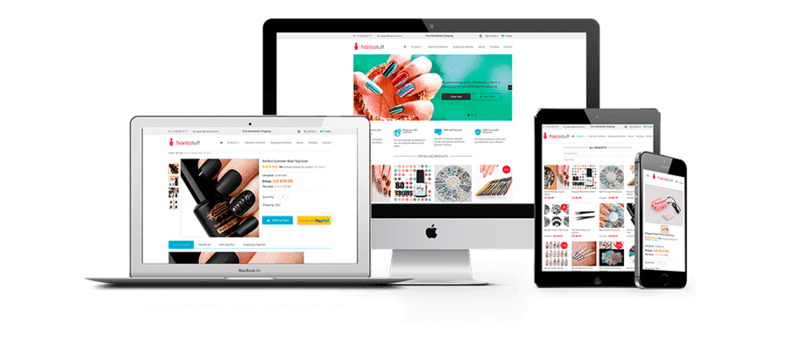
  • Look adorable and artistic
  • Are optimized for the highest possible conversions
  • Work smoothly on all the possible devices (personal computers, laptops, tablets, and smartphones)

You can view our themes on this page.

Also, you can click on each theme to open it and learn:

  • What exactly does it look like

Click the ‘Live Demo’ button to view the full-screen design for the home page of a webstore based on this theme.

  • How does it look on different types of devices

Click on the little icons to learn how this webstore will look on a personal computer, on a laptop, on a tablet, and on a smartphone.

  • What are the technical features of the theme

View the ‘Specification’ tab to learn more about the technical details of the theme.

  • What is the history of updates and improvements for this theme

View the ‘Changelog’ tab to learn how our specialists systematically review and upgrade the themes to get rid of possible bugs and introduce new convenient features.

2. So, all of the AliDropship clients can only choose between these 4 themes? You make tons of websites, and all of them look nearly the same? Where is the uniqueness?

Okay, let’s start from the beginning.

Yes, we only use 4 themes for AliDropship custom stores.

And yes, every store we ever made is built on the basis of one of these themes.

And yes, every store IS STILL UNIQUE in its own way!

What do we mean?

The webstore theme is a “skeleton”. It’s the basic structure of the website, and its function is to achieve smooth performance and operation of the site.

Think about cats, for example: these gorgeous animals have the same skeleton that allows them to move graciously. Still, every cat is unique: they all have their specific eye color, fur pattern, hair length, voice tone, etc. The same is true for our webstores: even though they are built on the same structures, from the visual point of view, they are really different.

How do we achieve that?

When clients contact us to order a custom store, we ask them to fill in our standard questionnaire about their personal preferences and wishes. Our customers can tell us everything about the desired product niche, color scheme, logo ideas, etc. They can even show us the examples of banners, pictures, headers etc. they liked on other websites.

We carefully consider all the requests and use our own creative vision to make several design elements that are specially tailored for this particular store.

These elements include logos, icons, favicons, and header images. As you understand, they are TOTALLY unique for every store we create – we NEVER use the same design elements twice.

That’s how we get a specific and memorable appearance for every webstore!

3. Okay, but I still want a REALLY unique theme. What can I do?

If you don’t want to use AliDropship themes as the basis for your store, there is a great alternative.

Your solution is WooCommerce drop shipping. To get a WooCommerce-based store, you will need to install AliDropship Woo plugin. There exist hundreds of WooCommerce themes, so you’ll be able to choose something that is not used by others so often.

Please note: these themes are developed by people living all over the globe and having different skills and different artistic vision, and not by our team.

4. Is it possible to combine themes? I like the shopping cart design on Rembrandt, but I want the main page to look like Michelangelo. Can you make a website out of several parts?
Webstore Design and Themes

Do you know the story about doctor Frankenstein and his monster created from different body parts?…

Technically, it is possible to make a fully functional website if the elements are taken from different themes. Still, you need to remember that it is a complicated technical job, so it will take a longer time, and also it will cost a little extra.

5. Can I order a store with one theme, and then switch to another theme?

Totally!

When you switch between themes, you need to manually adjust many different things to make the store look neat and professional.

For example, the placement and size of pictures and banners are different on all the themes. It means, if you want to switch to another theme, you will need to make amendments to your existing webstore design elements, and upload them on the website again.

But if you’re ready to dedicate some time and effort to it, you can surely do whatever you want. It’s your own store, after all!

If you want it, you can even switch to the WooCommerce if you have the original AliDropship store, and vice versa. It will take some time (you will need to re-upload all the products again and adjust all the design elements from scratch), but if you really really want it, nothing is impossible😉

6. Can I customize the store myself? How much can I change, and what exactly?

As the full owner of your store, you can do WHATEVER YOU LIKE to change any of the customizable settings. Where you can find them?

When you log into your drop shipping store, you can see the ‘Customization’ tab in your admin area.

In this section, feel free to play with settings you fancy! You can modify them as often as you want to test if your customers like the new version of your webstore design more.

You can read more about the store customization here.

7. Can I move the widgets to a different place on a page?

The placement of the widgets is defined by the store theme you’ve chosen.

You can’t move them to a different place, but you can choose which widgets exactly will be shown on the page.

8. So again, if I order a webstore, which design elements will be included in the package?

Traditionally, these elements are:

  • Custom logo
  • Header images
  • Icons
  • Favicon
  • Banners

Here you can read more about these webstore design elements and their importance for your business image.

9. I already have a logo and I want you to use it! Can you integrate it into your design?

Yes, if you already have some webstore design elements created by yourself or someone else, please send the files to us, and we’ll see what we can do.

We can use these files if:

  • They are suitable from the technical point of view (size, resolution, aspect ratio, etc.)
  • They are suitable from the artistic point of view (the website design is complex, and all the elements must match each in terms of style, color, etc.)

If possible, we can take the design elements you’re showing us, and change them a little upon your approval.

10. Where do you source the images for headers, banners, etc.? Are they copyrighted?

All the images we use in our designs are bought from stock photo libraries such as Shutterstock. These pictures are licensed for commercial use, which is why it is 100% legal to use them for your webstore design.

Well, that’s the whole story.

Now you can be absolutely sure that you get a beautiful and truly individual design when you order a custom store from us!

This image has an empty alt attribute; its file name is shopify-banner2-1.jpg

AliDropship Plugin vs AliDropship Woo: How Are These Dropshipping Tools Different?

When an entrepreneur looks for the best dropshipping tools on the market, a careful research is always necessary. The chosen software should simplify order fulfillment, work with product description and images and solve numerous other tasks that are necessary to sell products effectively. Let’s find out what’s the difference between two of the most popular solutions offered by our team!

AliDropship plugin gets chosen by thousands of people all over the globe. Both newcomers and experienced businessmen buy the plugin because they want to dropship products and manage their stores in a quick, easy and efficient way.

Sometimes our clients feel slightly confused: when we receive their order on the plugin purchase, we offer them to choose between two plugin versions which are AliDropship Plugin and AliDropship WooCommerce Plugin.

But how to choose the right one?

What’s the difference between these dropshipping tools?

Which one is better?

Today, we’re answering these questions once and for all!

1. What do you mean by AliDropship Woo plugin?

So, there exists AliDropship plugin that manages the majority of the dropshipping processes automatically.

For the convenience of its users, 2 versions of the plugin were developed by our team.

The first version is AliDropship Original Plugin: it works on any general WordPress website that has no WooCommerce plugin installed. It is important to note that this plugin is only compatible with webstore themes offered by AliDropship.

The second version is AliDropship Woo plugin: it will ONLY work on your website if you have the WooCommerce plugin installed on it.

In case if you don’t know what is WooCommerce exactly, please go to this article.

2. Okay, but which one dropshipping tool is better?

dropshipping tools

From the technical point of view, both dropshipping solutions are great, really🙂

Both of the plugin versions are carefully tested and regularly updated by our enthusiastic team of highly skilled developers.

From the point of view of the business performance, both of the versions also show equally impressive results. For example, our client, Kingpin from India, uses AliDropship Woo plugin which helped him achieve $28,000 in sales in the first 30 days of the business operation. Another client, Otto from the Baltic states, uses the original version of AliDropship plugin – this is how he made $13,000+ in a single month.

Read more success stories from our clients who use AliDropship plugin here.

Still, it needs to be mentioned that from the point of view of their functionality, the plugin versions are quite different.

Initially, the plugin was created for one simple purpose: to automatically perform the most important tasks of dropshipping. This is why both of the plugin versions can:

  • Import products from AliExpress
  • Import product reviews from AliExpress
  • Update product info
  • Apply pricing markup formula
  • Process the orders placed in your store

So, as you can see, both of these dropshipping tools do the job that takes the majority of time in a daily drop shipping routine, and these processes are completed automatically.

BUT.

AliDropship original plugin has an extended range of additional features and dropshipping tools (for example, it has several built-in themes, a convenient dashboard showing the most important store stats, etc.), which makes it the perfect choice for people who don’t have much experience yet. In other words, it’s an all-inclusive solution that helps you create a turnkey-ready store without any additional development/installation works.

AliDropship WooCommerce plugin, in turn, has only the strictly necessary features: it only performs the core dropshipping functions listed above.

Why is that?

Well, because of the exceptional mechanism of WooCommerce itself. It was designed as a solution for full website customization, which is why there exist a specific plugin or tool for every specific management task. There isn’t such a thing as a universal plugin that would do ALL the desired job. Instead, a WooCommerce website owner is supposed to be skilled and inventive enough to independently source and install a separate plugin for every single one of his/her goals.

You can view the comparison of both versions’ features here.

3. I like the idea of full customization! Is it also true for the store design? I want a 100% unique dropshipping store, you know…

dropshipping tools

Yes, if you want a super exclusive store with one-of-a-kind design, WooCommerce dropshipping is a good solution.

The thing is, thousands of developers all over the globe develop and upload numerous plugins, tools, and themes for WooCommerce: by combining and choosing these elements at your own pleasure, you get a distinctive store that has no analogs.

But.

AliDropship has NO self-developed WooCommerce themes: we only have 3 store themes that are compatible with the original plugin, built on the example of the most successful stores in the global e-commerce practice, and fully optimised to bring the highest returns.

So, when you buy AliDropship Woo plugin, you don’t receive any built-in store themes along with it. It is totally up to you to find a suitable theme, upload it, and install on your website.

It’s worth mentioning that all the existing Woo themes are produced by people who live all over the world, use a very different professional background, and have really different design and development skills. This is why AliDropship, unfortunately, can’t guarantee that a Woo theme you choose will be good-looking on any device, highly convertible, and smoothly working.

Still, as we really want to help you with your business growth, we have tested a number of the most commonly used WooCommerce themes. Based on our developers’ feedback, we made a list of the most appealing Woo themes in terms of their flexibility, safety, and ability to generate sales. You can find the list of the recommended Woo themes here.

4. So, I got the AliDropship Woo plugin, but, when I log in, I don’t see a logically structured dashboard in my store! What the…?!

Yes, that’s exactly what we were talking about.

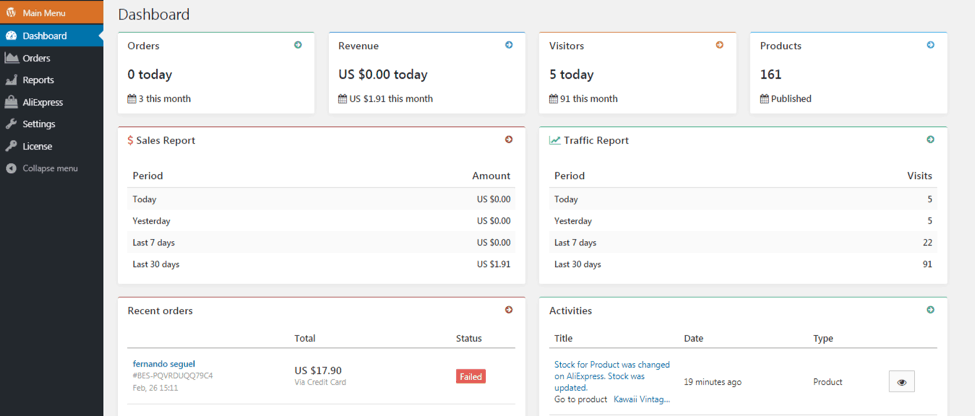
When you install the original AliDropship plugin and log in to view the admin panel, the first thing you see is a dashboard that shows the overview of your store stats (you can see the example below):

dropshipping tools

But, when you work with the AliDropship Woo plugin, it gets a little bit more complicated.

If you run a WooCommerce-based dropshipping store, you can view its stats in the internal admin panel, or use a different independent plugin for this purpose.

There should be a separate plugin for each separate task, remember?…

  5. Oh. But your AliDropship Woo plugin still processes the orders, right?

Certainly!

Both our plugin versions can automatically redirect the order information to original AliExpress supplier.

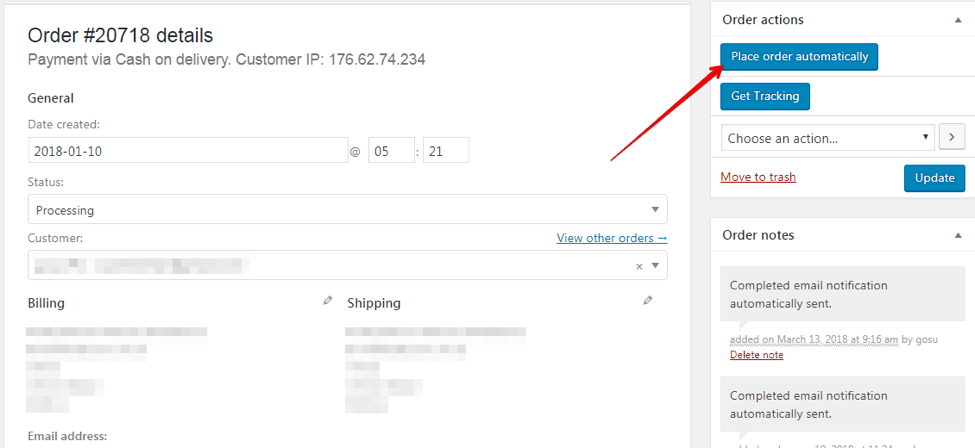
If you use AliDropship Woo plugin, you need to go to the WooCommerce section, then choose the Orders tab, and click on the order you need to redirect. When the window with this order details opens, all you need to do is click on the ‘Place order automatically’ button.

dropshipping tools

After this, the plugin will do all the job: it will visit AliExpress, select the necessary product variation, add the chosen items to your shopping cart, and write your client’s delivery address on the checkout page.

The only one action you need to take after this is click the Confirm & Pay button at the bottom of your page.

That’s it!

And for the AliDropship plugin, the orders processing is even quicker: you can read the step-by-step guide and view the video instructions here.

6. Are the shipping options identical for both the plugin versions?

Generally, AliDropship plugin allows you to select, set up, and modify lots of shipping options – you can read more about it here.

Still, there are differences.

When you use the original AliDropship plugin, all of your settings are automatically applied to all the deliveries arranged to any country on the globe.

When you use AliDropship Woo plugin, you need to deal with the so-called Shipping Zones: it means that you need to individually assign these settings for every separate region.

7. How do the plugins work with tracking?

If you have the original AliDropship plugin, simply read this article in our knowledge base to find out how to track the order details and how to automatically send the right tracking IDs to your buyers.

If you have the AliDropship Woo plugin, you need to do the following:

  • Enable your Google Chrome extension
  • Log in to your AliExpress account
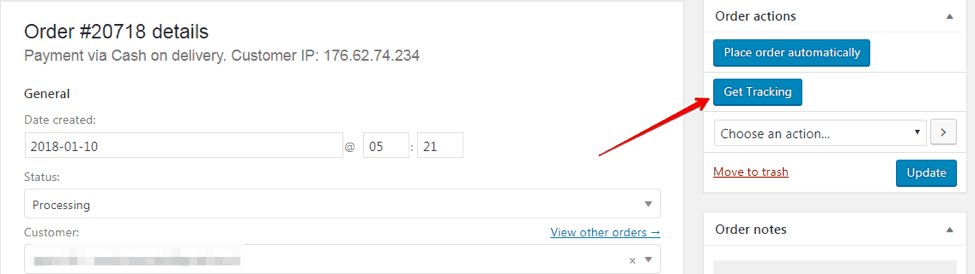
  • In a different browser tab, open the Orders section and hit the ‘Get tracking’ button
dropshipping tools

The plugin will synchronize your AliExpress account with your store and, if the original supplier has already provided the tracking ID, this number will automatically appear on the Order page.

8. What about payment gateways?

The original AliDropship plugin is compatible with the majority of the most popular payment gateways across the globe. Here you can view the list of payment gateways supported by AliDropship plugin.

With AliDropship Woo plugin, it’s a whole different story: WooCommerce itself supports almost every payment gateway that exists in the world. It means that you can go on the WooCommerce official website and download any plugin that attaches the necessary payment gateway to your store. Alternatively, you can look for the necessary plugins on the official websites of the desired payment gateways.

9. Can I install Woo plugin on a general WordPress site, or use the original plugin on a WooCommerce site?

dropshipping tools

Well…it’s not a really good idea in terms of compatibility and smooth working process, and here is why.

The original AliDropship plugin only runs effortlessly on general WordPress websites that have no WooCommerce plugin installed.

The AliDropship Woo plugin is specifically developed to be used on WooCommerce sites.

If you try to mix them up, your store simply won’t work as planned.

Please note: if you already have one of the plugin versions running, it will be quite time-consuming to switch to the alternative one as you will have to delete the current store contents and import all the products from scratch. 

10. Is the Woo version a good choice for a beginner in dropshipping?

Hmm.

As you have noticed it from the previous parts of this article, WooCommerce itself is a platform that requires considerable technical knowledge and/or development skills.

If you don’t have any experience in building websites and running online stores, we strongly recommend sticking to the original AliDropship plugin. It has all the necessary drop shipping tools already integrated, which is why you won’t have to waste your time and nerves on the selection and installation of additional plugins.

11. Okay, but…  I still can’t decide which of these dropshipping tools suits me better.

There’s nothing to worry about! Go through this tiny checklist and tick the statements you agree with.

  • I want a store with a totally unique layout that doesn’t look like anything else
  • I am a programmer / developer / IT person
  • This is NOT the first online store I’m going to have
  • I’ve tried all the basic dropshipping solutions on my previous stores, and now I want something a bit more interesting
  • I’m curious to assemble my store from lots of tiny details, like a Lego bricks dollhouse

Have you just ticked more than 4 statements? Go for AliDropship Woo plugin.

Have you just ticked less than 4 statements? Go for original version of AliDropship plugin.

From the video in our branded YouTube channel, you can learn more about the two types of dropshipping tools: the original AliDropship plugin and its WOO version.


That’s probably all you need to know about our dropshipping tools! So, which version of AliDropship plugindo you prefer?
This image has an empty alt attribute; its file name is shopify-banner2-1.jpg