How to Easily Manage Day-to-Day Operations in Drop Shipping Business: Q&A Series #5

Every day we get hundreds of questions from absolutely different categories of people.

Can you guess who are the most common askers?

Happy new owners of drop shipping stores have more questions than anyone else!

It’s an absolutely normal situation if you don’t know how to run your brand new business. Don’t worry, you will learn it all in due time. And as for now, we’re always here to guide you.

1. What should I do day to day to manage my webstore?

It may sound obvious, but you need to actually run your drop shipping business every day if you want it to be successful.

It’s not enough to simply own a store without doing anything to it. Take a look at the success story of Alex – during the first month of his newly opened store operation, Alex did nothing to manage the operations. As you can guess, the results weren’t satisfying at all. Everything changed as soon as Alex started paying attention to the business, and now things are going more than well.

So, as an owner of a drop shipping business, you need to:

  • Manage orders and payments, inventory, and track delivery

Well, this is the essence of drop shipping business, right? You don’t have to handle storage and shipping issues (and it saves you tons of money!), but still, there are business operations that must be managed.

You have nothing to worry about, though, if you have AliDropship plugin already installed. In terms of business operations, it does the majority of necessary tasks, so the only thing you actually need to deal with is human factor.

  • Communicate with your customers via email and other means

Communication and interaction is probably the only thing that can’t be automated in this business field.

People value personal attitude, and it becomes exceptionally important when it comes to e-commerce.

Just think about it: someone decides to buy a product from you without seeing this item first; basically, this person trusts you with their money, and, to be honest, takes a risk.

Don’t leave them confused and uncertain! Help them, guide them through the store and the shopping process, encourage them to make a purchase, and thank them for their decision.

This is how you will turn their random purchase into a very personal and pleasant experience. This is how you will create additional value of your store, and this is how you will carefully build an audience of loyal and engaged customers.

  • Drive traffic to your webstore

People won’t locate your store easily, you know?

The competition is astonishing, and Internet is huge.

This is the challenge that can and must be taken. All you need to do is pay attention to your promotional efforts. If you don’t know where to begin, take a look at our Marketing Tips blog section.

  • Search and import new products for your webstore

It is important to do it regularly – this is how you will keep your existing customers enthusiastic about new offers they didn’t see before. Also, don’t forget about trends and fashion – technologies and interests change quickly, and it is vital to go with the flow. Nobody likes outdated and boring items!

  • Edit the pages content to make the store look neat and professional

Mostly, it refers to single product pages – when you import new products from AliExpress, the titles and descriptions you get are not perfect at all. This is why it is necessary to take some time and edit everything that doesn’t look good.

Also, don’t forget about search engine optimization – keep it in mind when you’re editing the pages’ content. You won’t see immediate results, but in the long run, these efforts will give your more benefits than you can imagine.

2. What are the costs of running and managing a drop shipping webstore?

Oh, no one can tell you that, actually.

Let’s think of all the possible costs you might have in this business:

  • Hosting payment – sorry, you just can’t go without it.
  • First orders payment – you need to order an item on AliExpress to get it delivered to your customer. So, at the beginning of your drop shipping journey you will spend your money first to get later paid by your customer.
  • Marketing activities – everything is up to you here. Maybe you will launch a full-scale campaign that will cost you hundreds of dollars, and maybe you will simply install some promotional plugin like Social Rabbit.

As you can see, it’s impossible to predict the amount of your expenses. No one defines it but you!

3. What should I do when I receive an order?

Step one: get excited.

Step two: go to the Orders section and click the “Place order automatically” button.

AliDropship plugin will visit AliExpress and create an order for you automatically. It will select necessary product variations, add items to your shopping cart and fill your customer’s shipping details on the checkout page. You will just need to click confirm button to complete a purchase.

Alternatively, you can place the order manually by clicking “Place order manually” button.

Step three: celebrate!

4. Will the cost of an item on AliExpress be deducted from my PayPal account?

AliExpress doesn’t support PayPal as a payment method which is why you can’t use your PayPal account to pay for purchases on AliExpress.com.

In other words, the cost of an item won’t be deducted from your PayPal account. Instead, while placing an order on AliExpress, you can use one of the payment methods supported by the platform.

5. Does the plugin import the shipping costs or do I have to add shipping options to my products?

AliDropship Plugin doesn’t import items’ shipping costs.

We highly recommend offering your customers a free shipping service by taking advantage of the free/low cost shipping offered by many AliExpress sellers. However, the Plugin has a special section where you can enable or disable different shipping options.

You can add up to four different shipping options (including free shipping) to any or all products.

6. Are the customers able to create an account on my website?

Yes, your clients can get the option to create a personal account on your website.

This account gives your customers the opportunity to store their contact and shipping details, check the list of products they purchased, and track the status of any order.

7. Will the customer receive a tracking number? How can our customers track their orders?

Once you placed an order on AliExpress and your supplier shipped an item, you get your tracking ID.

The plugin will automatically collect this tracking data and add it to your order details.

Please note: you need to be logged in your AliExpress account and your AliDropship orders section to activate this tracking auto-filling option.

8. How can I know if the package was delivered to the customer?

If there’s a tracking number available, you can easily track the package delivery.

With this tracking ID provided by the AliExpress supplier, you can check if the customer received an item.

9. My customer didn’t receive the order. What should I do?

First of all, stay calm and don’t panic.

Unfortunately, this happens.

Maybe something went wrong within the postal service, or the customer provided a wrong address, or a seller is shady (did you choose the seller carefully?). You’ll figure it out later, but right now it’s not the first priority.

Secondly, apologize.

Whatever happened, it can all be fixed. Your behavior and personal attitude will help a lot to solve this issue.

If your client did not receive the order or is not satisfied with his purchase, you should follow AliExpress Buyers Protection Policy.

We recommend you to talk to the seller first. Go on AliExpress, open “My Orders” page, select the faulty order and write a private message to the seller. The seller should respond quickly and offer different solutions to fix it. The reputation of the sellers is rather exposed and they are willing to do anything to maintain their feedback rating.

10. How will I handle refunds?

One of the reasons why AliExpress is perfect for drop shipping is its good protection system with full money back guarantee.

So, if your customer is not satisfied with a product and asks you for a refund, you should dispute the purchase with AliExpress seller.

If you are selling inexpensive products, your AliExpress suppliers usually refund you quickly and don’t ask you to return the items. They don’t want to waste their energy on managing disputes and receiving returns for relatively low value items. You can read about it more in our interview with an actual AliExpress seller.

As the result, you can give a full or partial refund to your customer through PayPal without asking them to return the product. This is why we recommend you not to spend all your earned money at once – keep a small fund just to be safe.

Are there any questions we didn’t cover? Feel free to leave them in the comments section below!

This image has an empty alt attribute; its file name is shopify-banner2-1.jpg

How To Choose A Domain Name For Dropshipping Website: Q&A Series #6

how to choose a domain name

Are you wondering how to choose a domain name for your drop shipping website? Here are the expert answers to the most common questions that typically come from the online business newcomers.

Every business starts with an idea.

A drop shipping store starts with a niche.

Your website starts with a domain.

Our today’s article is all about a highly important topic. Here, we will explain how to select, evaluate and purchase the perfect domain for your drop shipping website.

Let’s start with the basics, as usual!

What is a domain name, exactly?

how to choose a domain name

To put it simply, a domain is the main part of your website’s URL address.

For example, take a look at our website’s address:

https://alidropship.com/

Here, ‘alidropship.com’ is the domain. It consists of 2 elements:

  • ‘alidropship’ part is a so-called Second Level Domain

This is a word or a combination of words that you choose to represent your drop shipping website.

Theoretically, you can select any combination of letters and digits to be your second level domain. Still, this combination should make sense – something like higur465wy24.com doesn’t inspire much trust, right?

Usually, the word or phrase in the second level domain is identical to the store name. It makes lot of sense since it helps you with branding.

But, alternatively, to get better Google rankings, you can take the main store keyword and play with it a little. The idea here is to to create a short, memorable and catchy phrase – and we will elaborate on this further.

  • ‘.com’ part is a so-called Top Level Domain

There exist a limited number of top level domains, so here you don’t need to invent anything. Simply follow the basic rules and choose among one of the options available.

Wait, what? There really are rules that regulate how to choose top level domains?

how to choose a domain name

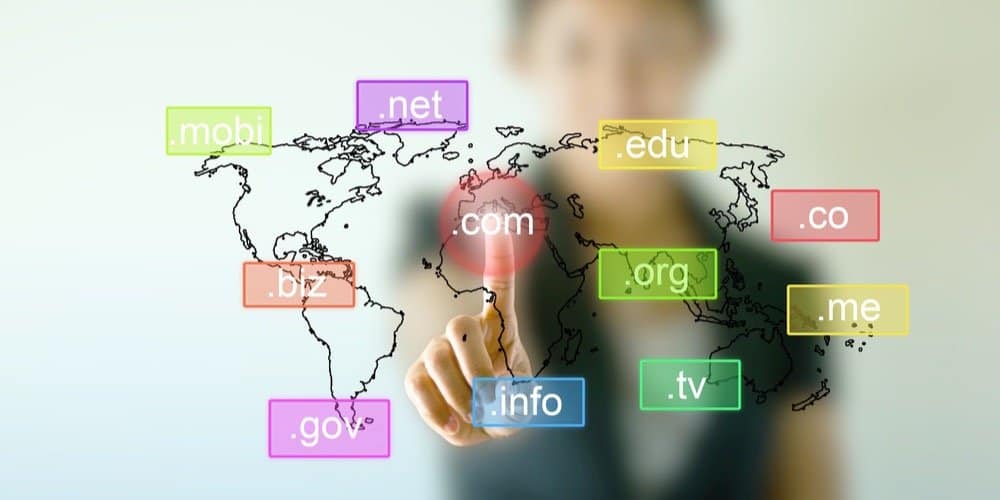
Traditionally, top level domains demonstrate what is the type of an organization that uses them. Let’s go through the most common ones:

  • .com domain is generally used by companies and organizations who run some kind of business or who hold this website because of some financial purpose. It has the reputation of the most popular, prestigious and trust-inspiring domain. Naturally, it makes it highly popular among businesses and enterprises worldwide.

We personally recommend to go for the .com domain. In our experience, short and keyword-rich names with .com top level domains show better results. Moreover, they prove to be more efficient for drop shipping websites.

  • .co domain is a relatively new alternative to the .com one (the majority of appealing names on the .com domain is already taken, which is why entrepreneurs go for a different option).
  • .biz domain (‘biz’ is short for ‘business’) is basically used in the same cases, but for some reason, it is much less common and not as widespread as the .com one.
  • .net domain is normally associated with hi-tech businesses, information technologies, startups, and other tech-related entities of this kind.
  • .org domain (‘org’ is short for ‘organization’) is usually chosen by charities and other non-profit establishments that don’t put finances in the core of their activity.
  • .info domain traditionally belongs to websites and blogs that have an enlightening or informational purpose and exist to raise awareness about something.
  • .edu domain is regularly taken by educational institutions of various types.
  • .gov domain belongs to governmental entities across the United States.

Plus, there exists a number of country-specific top level domains, for example:

  • .uk goes for the United Kingdom
  • .us for the United States
  • .il for Israel
  • .au for Australia
  • .de for Germany
  • .fi for Finland
  • .jp for Japan
  • .kr for South Korea
  • .nl for the Netherlands
  • .ru for Russia
  • .se for Sweden, etc.

Only specific companies, associations and authorities have the permission to use such country-related domains. So, most likely, you won’t even need them for your business. Actually, it won’t even be necessary – with drop shipping, you don’t have to limit your ecommerce store activity with a certain geographic region.

Are there any similar rules for the selection of a second level website domain?

how to choose a domain name

Oh, this is the most exciting part.

When you’re choosing a top level domain, you don’t have much room for imagination and inventiveness. All you need to do is simply pick one of 20-30 available options.

But when it comes to the second level domain name, it’s a whole different story.

When you’re creating your store domain, there are 3 vital things to consider.

SEO

If you want to achieve favorable Google rankings, it’s wise to include a SEO-friendly word or phrase in your domain.

This is why many drop shipping business owners build their webstore domain around their main keyword. For this purpose, they can also use any of the supporting keywords. This way, they solve 2 issues at once. They improve their rank in search results, and make it easier for Internet users to stumble upon this particular webstore.

Of course, it’s necessary to treat this optimisation thoughtfully. A website that has an address like buyofficechairsonlineusa.com looks quite suspicious. It even creates the impression of something potentially harmful, like it poses a threat to the visitor.

A domain name that solely consists of a long-tail keyword looks spammy and doesn’t inspire much trust. Plus, it doesn’t help you create a memorable shopping destination that stands out from the competition.

This aspect brings us to the next crucial consideration point which is…

Branding

Do you know why you, an owner of a tiny drop shipping store, can successfully compete with trading giants like Amazon and AliExpress itself?

It’s all because you can create a recognizable and buyer-oriented shopping destination with a totally unique atmosphere and friendly environment.

Your range of activity is rather small in comparison to huge shopping platforms, and this gives you an enormous advantage. When you concentrate on a tiny amount of products to sell, you are able to provide top-class customer service. This is the perfect strategy to win the hearts of your buyers.

This challenging yet rewarding job of creating your own in-store universe starts with… your website address and, more specifically, your domain name. Basically, when people visit your store, the first thing they notice is the website address and the domain name. At this moment of the first encounter, your website name provokes some specific expectations. Obviously, it’s your responsibility to meet them.

This is why, ideally, a good domain name should clearly indicate what this store is about – this way, you gain recognition and support the creation of your own, unique brand that is strikingly different from the competitors’ offers.

Credibility

As we have already mentioned it, your drop shipping website URL is the thing that makes the first impression. The domain name, naturally, plays its role, too.

Will an Internet user actually visit your store after noticing it in the search results, or not?

It heavily depends on the quality and contents of your domain name. Imagine that it consists of an odd word combination, or a random mix of letters and numbers making no sense. Even if its brilliant in terms of SEO, the majority of Internet surfers won’t even click on it.

The same goes for a website that obviously speculates on a well-known brand or trademark. Typically, scammers do it by using either the wrong spelling (abibas.com). Alternatively, they can pick a top-level domain that is slightly different from the official one (adidas.net). No one likes scammers, so misleading people with an illegal use of someone else’s brand shouldn’t be you strategy.

Plus, people will avoid your website if its domain name looks silly or scary because of unintentional inappropriate word combinations. Think of domains like therapistbay.com or bestkidnaps.com, for example.

You should also avoid accidental negative meanings in foreign languages. Surely, it is impossible to consider all the languages that exist across the globe. Still, check the meaning of the chosen name in the language of your target audience. Additionally, consider its meaning in the most common languages in the world (Chinese, English, Hindustani, Spanish and Arabic, at least).

So…how can I generate a drop shipping website domain, actually? What should I do technically? And how can I buy the domain?

Oh, it’s a really simple and totally entertaining procedure.

First, you need to go on a domain generator website. Tons of them provide their service for free, so you won’t pay anything extra.

We strongly recommend the Namemesh generator: it is awesome because it lets you evaluate the appeal of any domain name by several parameters at once.

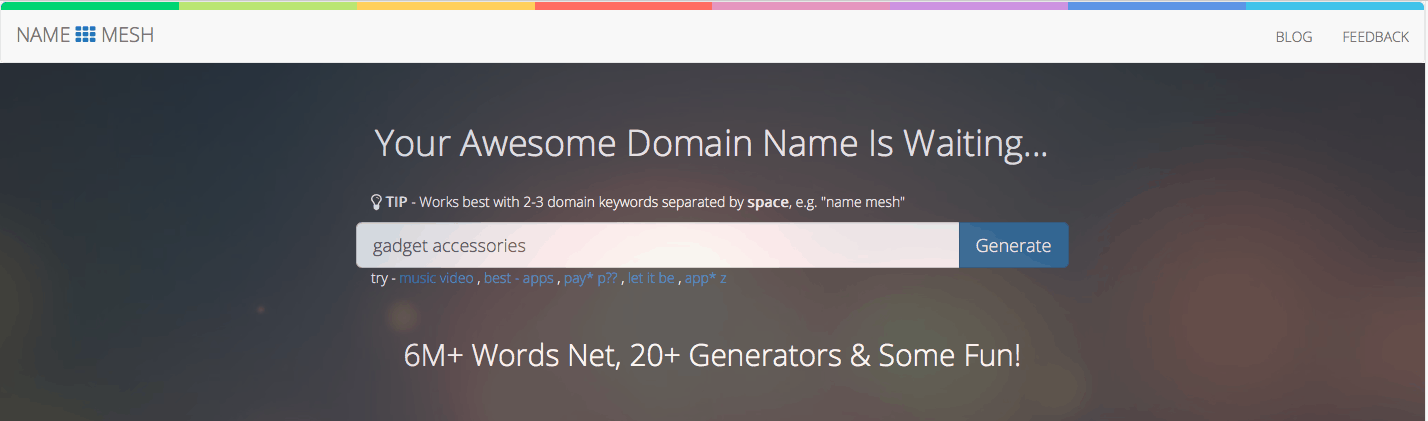
It works the following way: you enter 2-3 words into the search bar, and press the ‘Generate’ button.

domain name generator

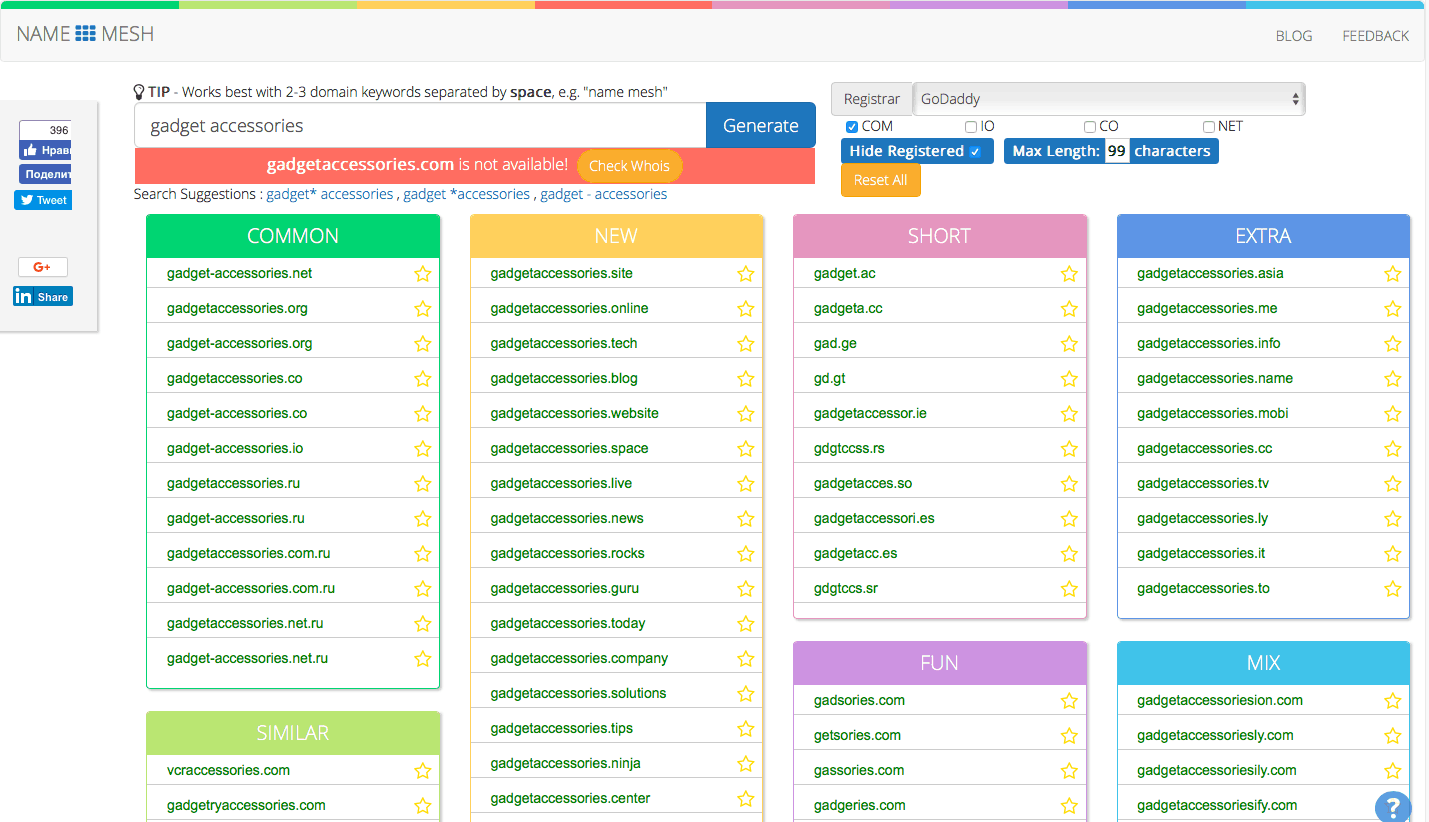
The system shows all the possible combinations of these words, and divides the domain name suggestions into several categories:

  • Common – these are the most ‘traditionally-looking’ names with typically used top level domains (also called extensions) like .com, .net., org, etc.
  • New – these are the names containing the most recent extensions that become available for websites (.tech, .chop, .center, etc). Since these extensions are really ‘young’, there’s a good chance to grab a vacant name earlier than anybody else.
  • Short – this section contains the shortest domain names available. In general opinion, the shorter is the domain, the better it is for your recognition. Still, don’t forget that it should make some sense!
  • Extra – these are the domain names with ‘unusual’ extensions like .name, .me, .ly, etc. In a way, they are similar to the ‘New’ category, but these ones are not uncommon for the worldwide practice.
  • Similar – these domains don’t contain the exact keyword you’ve provided. Instead, they are based on synonyms, antonyms, related words, etc. Here, you get unconventional names that describe your business concept in a more ‘smart’ way. In terms of branding, they might be the perfect option for you.
  • SEO – this section includes the names that are perfect in terms of potential Google rankings. The system slightly modifies the main keyword through the use of prefixes or suffixes. This is why you get a list of SEO-friendly yet sensible domain names.
  • Fun – the website domains listed in this category are the result of smart word modification: blending and meshing words, misspelling, phonetic variations and other tricks are used. As the result, you get some unique yet meaningful words that can make a perfect brand names.
  • Mix – other words, prefixes and suffixes get mixed into the keyword you’ve provided.

So, you get a full page of the results with the the possible domains:

website domain generator

As you can see, you can make some amendments to the generated results and play with them further!

For example, you can check out every single one of the Search Suggestions to get more relevant domain options. It’s quite handy if you’ve already tried everything and can’t think of other good names.

Also, you can hide the already registered domains – it definitely saves your time. Besides, you can explore the WhoIs database. There, you will learn who has purchased the most appealing domain. In some cases, it might be useful to contact the current owner and try buying out this particular domain.

You can also set the preferred domain length and tick the top level domains you’d like.

And finally, we’re coming to the most important part. Here, you can also choose the registrar service that will sell you the best domain name!

how to choose a domain name

In order to actually purchase the domain you’ve picked, you need to visit a different place – a registrar site. There, you make your user account, provide the necessary documents (IDs, etc.) and pay for the purchase. This is how you become a legal owner of a domain at your choice.

Namemesh site doesn’t sell the domain names. Instead, it lets you check the most credible and trustworthy registrars that are really popular across the globe:

It doesn’t matter what registrar service you use. All of them have the same range of domains available. Actually, it’s impossible for a registrar to have ‘exclusive’ domains that you can’t be buy anywhere else. Plus, all of the registrars listed on Namemesh have the legal right to sell website domains.

Still, it’s a good idea to check the appealing name within each registrar anyway. The reason is simple: even the identically same names can have totally different prices across various services.

So, to be a smart shopper, you need to:

  • Go on Namemesh
  • Select one registrar
  • Enter the keyword
  • Hit the ‘Generate’ button
  • Read through the generated list of domain names
  • Click on the name you like more

The system will automatically redirect you to the registrar site. Here, you will see the domain name price, and the instructions on the buying procedure. If you’re happy with the name and its price, follow the registrar recommendations and complete the purchase!

There are so many name options, it’s confusing! Is there any checklist on how to choose a domain name for my drop shipping business?

how to choose a domain name

Of course! Go through this list and tick the statements you agree with:

  • I like this domain name

Your personal opinion matters! You should be happy with the sound and the meaning of the name, no matter what marketing gurus say.

  • It is short

Roughly speaking, a length up to 10-12 characters is okay. You want people to remember your name easily, right?

  • It is easy to type

Again, it’s all about your brand recognition. Let’s suppose you’ve chosen a well-known word but opted for an untypical letters order in it. Chances are, people will simply misspell it while typing in the address, or writing hashtags in social networks.

  • It gives me some room for growth

In the world of drop shipping, it is super easy to expand your product offer when necessary. You can even switch to a slightly different business niche if you want to. Will the domain still be relevant for your store if you ever decide to add new product categories?

  • It is available on social media

To promote your store online, you need relevant accounts on social media. Imagine that somebody has created a Facebook account with the name that you have just picked. It would be quite a sad situation because it would make your buyers really confused. Plus, they will constantly mix you up with this random account.

Luckily, Namemesh has this adorable function of scanning social networks as well! Look at the picture below:

When you click on a suggested domain, the system checks the so-called ‘Social Availability’. It means that it analyses the existing Twitter and Facebook account names. You, in turn, can perform the same check on Instagram manually. This way, you can choose the identical names for all your social media channels. Surely, it helps you create a strong brand and boost your recognition.

  • It has a good history

Did you know that you need to check every domain name before purchase? Even if you’re not buying it from an actual previous owner, look into its history anyway. It is possible that this domain has some history anyway. Maybe, the owner has simply abandoned it several years ago after the domain expiry.  To make sure nothing suspicious was happening there, try using the Wayback Machine service. It shows whether someone has used the domain, and for what purpose.

If you’re buying a ’second hand’ domain, check the Expired Domains portal. Here, you will see domains with reliable history that are no longer in use for some reason. These domains can rank better on Google if the previous owner had no suspicious actions on them. So, you can even buy several domains and simply wait till one of them start ranking higher than others.

Have you ticked at least 4 items in this checklist? Go for this name!

That’s it for our today’s Q&A session. Now, you know how to choose a good domain name that will fit your drop shipping website perfectly – feel free to use the knowledge for your personal benefit!

This image has an empty alt attribute; its file name is shopify-banner2-1.jpg

Webstore Design and Themes: Q&A Series #7

Webstore Design and Themes

It’s time for the well-liked Q&A session again!

Today, designers and developers of AliDropship team are answering the hottest customers’ questions about webstore design and themes. Sit back and enjoy the reading!

1. What do you mean by themes? What are they? How are they different?

Imagine an online store.

As you can guess, a store consists of several elements: products gallery, shopping cart, contact information, etc.

All these blocks can be located in different places of a website, and also, they can look totally different.

Simply speaking, a theme of a webstore is the specific way of all these elements’ placement.

AliDropship team can currently offer you 4 themes that:

  • Look adorable and artistic
  • Are optimized for the highest possible conversions
  • Work smoothly on all the possible devices (personal computers, laptops, tablets, and smartphones)

You can view our themes on this page.

Also, you can click on each theme to open it and learn:

  • What exactly does it look like

Click the ‘Live Demo’ button to view the full-screen design for the home page of a webstore based on this theme.

  • How does it look on different types of devices

Click on the little icons to learn how this webstore will look on a personal computer, on a laptop, on a tablet, and on a smartphone.

  • What are the technical features of the theme

View the ‘Specification’ tab to learn more about the technical details of the theme.

  • What is the history of updates and improvements for this theme

View the ‘Changelog’ tab to learn how our specialists systematically review and upgrade the themes to get rid of possible bugs and introduce new convenient features.

2. So, all of the AliDropship clients can only choose between these 4 themes? You make tons of websites, and all of them look nearly the same? Where is the uniqueness?

Okay, let’s start from the beginning.

Yes, we only use 4 themes for AliDropship custom stores.

And yes, every store we ever made is built on the basis of one of these themes.

And yes, every store IS STILL UNIQUE in its own way!

What do we mean?

The webstore theme is a “skeleton”. It’s the basic structure of the website, and its function is to achieve smooth performance and operation of the site.

Think about cats, for example: these gorgeous animals have the same skeleton that allows them to move graciously. Still, every cat is unique: they all have their specific eye color, fur pattern, hair length, voice tone, etc. The same is true for our webstores: even though they are built on the same structures, from the visual point of view, they are really different.

How do we achieve that?

When clients contact us to order a custom store, we ask them to fill in our standard questionnaire about their personal preferences and wishes. Our customers can tell us everything about the desired product niche, color scheme, logo ideas, etc. They can even show us the examples of banners, pictures, headers etc. they liked on other websites.

We carefully consider all the requests and use our own creative vision to make several design elements that are specially tailored for this particular store.

These elements include logos, icons, favicons, and header images. As you understand, they are TOTALLY unique for every store we create – we NEVER use the same design elements twice.

That’s how we get a specific and memorable appearance for every webstore!

3. Okay, but I still want a REALLY unique theme. What can I do?

If you don’t want to use AliDropship themes as the basis for your store, there is a great alternative.

Your solution is WooCommerce drop shipping. To get a WooCommerce-based store, you will need to install AliDropship Woo plugin. There exist hundreds of WooCommerce themes, so you’ll be able to choose something that is not used by others so often.

Please note: these themes are developed by people living all over the globe and having different skills and different artistic vision, and not by our team.

4. Is it possible to combine themes? I like the shopping cart design on Rembrandt, but I want the main page to look like Michelangelo. Can you make a website out of several parts?

Webstore Design and Themes

Do you know the story about doctor Frankenstein and his monster created from different body parts?…

Technically, it is possible to make a fully functional website if the elements are taken from different themes. Still, you need to remember that it is a complicated technical job, so it will take a longer time, and also it will cost a little extra.

5. Can I order a store with one theme, and then switch to another theme?

Totally!

When you switch between themes, you need to manually adjust many different things to make the store look neat and professional.

For example, the placement and size of pictures and banners are different on all the themes. It means, if you want to switch to another theme, you will need to make amendments to your existing webstore design elements, and upload them on the website again.

But if you’re ready to dedicate some time and effort to it, you can surely do whatever you want. It’s your own store, after all!

If you want it, you can even switch to the WooCommerce if you have the original AliDropship store, and vice versa. It will take some time (you will need to re-upload all the products again and adjust all the design elements from scratch), but if you really really want it, nothing is impossible😉

6. Can I customize the store myself? How much can I change, and what exactly?

As the full owner of your store, you can do WHATEVER YOU LIKE to change any of the customizable settings. Where you can find them?

When you log into your drop shipping store, you can see the ‘Customization’ tab in your admin area.

In this section, feel free to play with settings you fancy! You can modify them as often as you want to test if your customers like the new version of your webstore design more.

You can read more about the store customization here.

7. Can I move the widgets to a different place on a page?

The placement of the widgets is defined by the store theme you’ve chosen.

You can’t move them to a different place, but you can choose which widgets exactly will be shown on the page.

8. So again, if I order a webstore, which design elements will be included in the package?

Traditionally, these elements are:

  • Custom logo
  • Header images
  • Icons
  • Favicon
  • Banners

Here you can read more about these webstore design elements and their importance for your business image.

9. I already have a logo and I want you to use it! Can you integrate it into your design?

Yes, if you already have some webstore design elements created by yourself or someone else, please send the files to us, and we’ll see what we can do.

We can use these files if:

  • They are suitable from the technical point of view (size, resolution, aspect ratio, etc.)
  • They are suitable from the artistic point of view (the website design is complex, and all the elements must match each in terms of style, color, etc.)

If possible, we can take the design elements you’re showing us, and change them a little upon your approval.

10. Where do you source the images for headers, banners, etc.? Are they copyrighted?

All the images we use in our designs are bought from stock photo libraries such as Shutterstock. These pictures are licensed for commercial use, which is why it is 100% legal to use them for your webstore design.

Well, that’s the whole story.

Now you can be absolutely sure that you get a beautiful and truly individual design when you order a custom store from us!

This image has an empty alt attribute; its file name is shopify-banner2-1.jpg

How To Make My Website Secure: Q&A Series #8

How to make my website secure

Our newest Q&A session is dedicated to the issue of online store security: read all about the technical aspects of keeping your website safe!

Taking care of your personal belongings is #1 priority.

And your drop shipping store is not simply a website you own – it’s not less than your personal achievement, your source of income, and, most importantly, your key to building a better future for yourself and your family.

How to make sure that this valuable asset won’t fall into the wrong hands?

Let’s figure it out!

1. What could be the most likely threats to my store?

From the technical point of view, there are 3 basic threats that are important to consider:

  • Website platform or plugins malfunction

If you haven’t updated your CMS platform for a long time, or if you have installed some pieces of additional software (themes, plugins, add-ons, etc.) from an unreliable source, you are basically putting your store at risk.

  •   Password hack

If you have a ‘weak’ password or if you keep it written in an easily available place, it won’t be difficult for hackers to steal your store data, as well as your money…and your business reputation.

  •   Viruses

If there is no trustworthy antivirus software installed on the device you use to run your store, or if you use an outdated browser version, the device (and the store) gets especially vulnerable.

2. How to make my website secure if it’s not ready yet? What can I do on the store development stage?

While your store is just being developed, you can do the majority of the steps necessary to ensure its safety:

  •   Consider which devices you’ll use to run your store. Contemporary automated solutions make it possible for you to access the store with the help of personal computers, laptops, tablets and smartphones. It gives you more freedom, and at the same time, more responsibilities. You need to check the browser versions on EVERY device and make sure you’re using the latest browser version.
  •   The same is fair for antivirus programs: check if you have them installed on EVERY device you’ll be using for your drop shipping business, and update them to the latest version if necessary.
  •   Create a strong password for your hosting account and for your website admin panel. Ideally, these passwords should contain at least 8 characters each, and it’s a great idea to include numbers and uppercase letters in them. The general rule is: the more complicated is the password, the harder it will be for a hacker to get an illegal access to your website.
  •   Pay a special attention to the place where you are storing all your valuable passwords. It’s not a good idea to use any kind of online storage for this purpose.
  •      Make sure that you’ve used the latest version of a CMS platform as the basis for your online store. Check its official website to learn more about the newest updates and most relevant proven versions.
  •   Do your best to only install plugins, themes and add-ons that are officially recommended by the CMS platform developers. Be really careful about so-called nulled plugins that are distributed for free – they are very likely to contain viruses and hurt your webstore.

3. How to make my website secure if the store is already running?

First, make sure you’ve taken all the steps described above.

Then, do the following:

  •      Follow the updates as soon as you learn about the newest ones. It’s vital for everything you use: the CMS platform, themes and plugins, antivirus software and browser versions. If all of them are kept up-to-date, it’s much harder for hackers and viruses to do harm to your store and you.
  •      Change login and password from time to time to prevent any unpleasant surprises. Make sure to always use an actually working email address – this way, you’ll be able to restore the login details in case you lose or forget them.
  •     Create backup copies of your webstore regularly – if something goes wrong, you won’t have to destroy the store and start all over again, you’ll simply have to go back to the latest saved version.

4. I’m worried and I don’t think it’s enough. Can I do something else?

If you think you need to do more to protect your website, our developers can recommend one of the following safety plugins for WordPress:

Simply speaking, these free plugins limit the number of login attempts when somebody tries guessing your login details and enter the admin panel, and they also alert you if there’s a security threat.

5. There’s a virus! Or a hacker attack. Or a dangerous software, I don’t know what’s it exactly! What should I do?

Stay calm! It’s gonna be fine, just follow these simple steps:

  •      Scan your device for viruses and delete all the suspicious things your antivirus finds
  •      Change the password to your hosting account, and the webstore login details
  •      Try to remember if you’ve installed any pieces of software recently, and delete all the questionable elements
  •      Update your CMS, all the trustworthy plugins and extensions to the latest version available
  •      Restore your webstore using the most recent backup copy you have
  •      If your store is built with the help of AliDropship solutions, don’t hesitate to contact our support team! The best option is to send an email on support@alidropship.com address – this way, you’ll be able to describe the problem in detail, tell about your actions, and attach screenshots if necessary.

Follow these simple rules and safely enjoy your thriving business!

This image has an empty alt attribute; its file name is shopify-banner2-1.jpg

How To Manage Social Media Accounts With Social Rabbit Plugin: Q&A Series #9

how to manage social media with Social Rabbit plugin

Lots of online entrepreneurs are wondering how to manage social media in the best way possible. To make it more time-saving and energy-efficient for our clients to run their drop shipping stores’ accounts on social media, we commonly recommend getting Social Rabbit Plugin. Here’s what you need to know about this awesome tool!

Why is this plugin recommended for social media management?

how to manage social media with Social Rabbit plugin

Let’s start with the basics: why should you even care about social media?

For any drop shipping store, a good-looking and regularly updated social media account is a blessing. It helps spreading the word about the wonderful store offers, proves that the business is alive and well, and lets your store get higher position on Google search results page.

Of course, it takes considerable effort to monitor and update multiple social media accounts of your store on a regular basis. As a drop shipping store owner, you have a bunch of other important things to do every day, which is why many entrepreneurs simply don’t research how to manage social media because they think it is not their first priority.

That’s exactly the reason why Social Rabbit was invented.

Social Rabbit plugin is a tool that helps you save time you’re spending on social media marketing activities.

Social Rabbit makes your store’s social media accounts look like you’ve invested hours of your time into thoughtful planning and careful crafting of every post (while actually you haven’t).

You simply select the necessary settings once, and the Rabbit uses these settings as the basis for its non-stop activity of managing multiple social media and placing high quality posts in every account.

The followers get highly engaged, the occasional readers become first-time buyers, and the loyal customers keep checking your account in search for a fancy new item or just a funny new post.

You’re getting so much for doing so little!

How to manage social media accounts with Social Rabbit? What can it do?

how to manage social media with Social Rabbit plugin

Okay, so there are 4 major social networks that have a more or less global coverage: Instagram, Pinterest, Twitter and Facebook.

Based on the settings you choose, Social Rabbit can automatically perform several types of actions in your store accounts on any (or all) of these social networks:

  • Publish your store products 

In this case, each post is dedicated to one of the products and services from your store: Social Rabbit automatically publishes a random item’s image along with its title, price, and link.

  • Make entertaining posts

Using the text templates, hashtags, and images you’ve previously added to the database, the Rabbit randomly combines these elements to create short-spoken, yet attractive and catchy posts. It will do all social media content marketing work for you. 

  • Repost blog articles

If you are running a blog in your store, you certainly want as many people as possible to read what you’re writing. Again, Social Rabbit randomly picks one article out of your blog posts, and places its link, title, and short extract in the relevant social media post. It is also possible to publish these articles in chronological order.

  • Sharing content generated by other users

To do this, Social Rabbit is scanning Instagram pages that contain the keyword(s) you’ve specified, and finding content published on these accounts. Then, the Rabbit reblogs these posts within the same social network: for example, it doesn’t repost Instagram posts to your Twitter feed, and vice versa.

  • Boost your social media accounts activity

Again, the Rabbit goes through the pages that contain the keywords related to your store niche. The Rabbit automatically follows these pages, likes the post published there, and even comments them in order to attract attention to your store social media profile.

It’s not always necessary to have all of these actions performed at once. It’s up to you to decide which of the plugin functions you enable now, and which ones you will turn on later as an experiment.

  • Search shoutout partners

This function is only applicable to your Instagram account. You need to specify the keyword(s) that are related to your store, and write a template message to ask for a business partnership (you can find an example here). The Rabbit uses the provided range of keywords to find appropriate Instagram pages, and automatically sends their owners the template message you’ve created.

How to manage social media automatically without getting a spammy-looking account?

how to manage social media with Social Rabbit plugin

People commonly ask us: will the Rabbit make them look like spammers?

It certainly will not, and here is why.

Consider this: how do you understand that a person is a spammer?

Most typically, we guess that an Internet user is spamming because his/hers actions look like something mechanical and even detached from reality. 

Their typical behaviour is to leave meaningless comments and even direct messages that commonly contain nothing but a suspicious site link and/or a short phrase like ‘follow me plz’.

Plus, these users do a really random mass following with no obvious pattern or reason: they simply add everyone they see (which leaves their ‘victims’ slightly confused). 

Finally, even if spammers make some effort to manage their own pages, their accounts don’t inspire much trust: they contain low quality images or poorly designed collages, and incomprehensible texts. What’s also remarkable, while figuring out how to manage social media, they don’t pay any attention to timing and place their posts with some weird frequency: their account can be silent for several days in a row, and then suddenly it bursts with activity which means you get forced to see dozens of questionable entries published in several minutes.

When you use Social Rabbit plugin, none of this happens.

It’s you who defines what will be written in the comments left by Social Rabbit: you prepare a database of possible message options, and the Rabbit only uses the phrases you’ve specified.

The same goes for photos and collages: you upload a range of relevant high-quality images that are dedicated to your store and to this whole thematic area in general, and the plugin never uses any extra sources to get the necessary images.

Also, you don’t start following hundreds of random people when you activate this plugin: you only add the accounts that are somehow related to your business niche. So, you exclusively attract attention of the people who are potentially interested in your store offers and, naturally, they are likely to make a purchase from you, or at least get curious about your social media account.

Obviously, the posting frequency settings can be customized any way you like it: Social Rabbit can schedule posts within the time frames you’ve set. It means you don’t have to worry about uncontrollable production of 20 publications in 1 minute!

And finally, there is one ultimate thing that makes it 100% clear you’re not a spammer: it’s the overall appearance of your social media pages. If they are set up and designed in a neat, professional and aesthetically appealing way, they leave no doubt about your reliability and fair business play. We have previously explained how to write a trustworthy and informative Instagram bio, but if you feel you need some additional help with this task, an expert service of social media creation might be a great solution for you. 

Will this social media plugin really boost my business?

how to manage social media with Social Rabbit plugin

Absolutely.

When it comes to sharing the knowledge about additional technical solutions for drop shipping stores management, our in-house experts performs meticulous checks of every recommended piece of software. This way, we can be completely sure we’re not promoting some malware, plus, we filter out the plugins and applications that don’t show any significant efficiency.

Social Rabbit Plugin is systematically used to boost profits in our own stores (as you probably know, our dedicated project team manages, promotes, and analyses the performance of several self-owned drop shipping stores). As the result, these specialists get the opportunity to test a full range of social media management techniques and scheduling tools, and deliver their experience to fellow entrepreneurs who have the same marketing needs – including the questions on how to manage social media!

The solid background of using Social Rabbit lets us safely say that this plugin:

  • Makes it possible to easily generate ‘human-like’ posts that don’t look spammy
  • Saves about 6 hours every day as the plugin produces ready posts that get published without extra management
  • Raises awareness about the promoted stores as the plugin helps to increase the number of social media followers
  • Attracts stable social media traffic to the stores in question
  • Boosts the number of orders placed in our stores as the plugin specifically attracts the audience that is likely to make a purchase

If you’re interested to find out more about our experience of learning how to manage social media with the highest efficiency, take a look at this articleIn this case study, we explain how we achieved 70,000+ Instagram followers for one of our stores’ accounts, show the stats on buyers’ behavior, and even provide a screenshot with the settings we’ve chosen for the Rabbit in this case!  

Speaking of which… how to set up Social Rabbit correctly?

how to manage social media with Social Rabbit plugin

From the technical point of view, the process of setting up Social Rabbit is quite easy and well-documented.

After you complete the plugin installation process, you first of all need to connect the plugin to the every social media account you will be promoting. It is done through the ‘Main Settings’ tab: in the Social Rabbit’s Knowledge Base, you can find the detailed instructions on enabling these main settings for FacebookTwitterPinterest, and Instagram.

Done?

Great!

Now, it’s time to specify what the Rabbit will be writing and posting on your social media channels.

You need to start with adding pictures to the Social Rabbit Gallery on InstagramFacebookTwitter and Pinterest: as we already mentioned it before, it’s a kind of a library or a database which the Rabbit uses to create a post. Sooner or later, each and every one of these pictures will appear in your social media posts, so be careful to only upload high-quality photos and attractive images

Also, you can instantly import free stock images from Pixabay.com and Giphy.com databases straight to your Media Gallery!

In order to specify the details of the actual publishing settings, go to the relevant ‘Posting Settings’ tab for  FacebookTwitterPinterest, and Instagram (for your convenience, each of these settings instructions pages has a relevant video tutorial included).

You need to assign its own posting settings for each of the social networks, but in general, they all cover the same parameters of these self-generated posts:

  • The posting frequency

You can set the exact amount of days, hours, and minutes that will be the periodic sequence of the posts.

  • The posting time randomizer

If each one of your posts gets published on exactly the same time (for example, at 10.00, 16.00 and 22.00 every day), your followers/subscribers might think it’s a spammy mechanical action. In order to make these posts look more ‘real’, it’s recommended to turn on the randomizer: it lets you pick a ‘deviation’ time period, and uses it to publish each the posts on a slightly different time.

  • Hashtags

If your social media post contains no hashtags, it won’t get discovered by people who are interested in this particular niche or area. On the Social Rabbit Posting Settings pages, you can easily write the hashtags that are relevant for the business focus of your store. Also, Social Rabbit plugin uses machine learning to look at any product featured image, and suggests the appropriate hashtags for this item.

  • Text templates

Here comes the most exciting part 🙂

It’s necessary to specify what exactly will be written in these carefully prepared self-generated posts. Remember that the Rabbit doesn’t write its own texts with the power of artificial intelligence 🙂

The idea behind the tool was to make these automated posts look as human-like as possible, so the system simply takes and randomly combines different pieces of content YOU have previously added to its database.

This is why it is so important to write short and slightly ‘abstract’ texts that match EVERY picture you’ve uploaded! Otherwise, it’s possible that the randomiser will make a meaningless post with a picture and a text not fitting each other at all. That’s a spammy-looking thing you need to avoid!

These texts are written in the Template field, and actually, it’s not only words and emojis that can be put there. The system also makes it possible to write so-called ‘tags’ along with the text. Each of the tags is a ‘shortcut’ for a specific action: for example, if you write the %URL% tag, the published post will include a product link, and if you write the %PRICE% tag. The post also will contain this specific product price. For your convenience, the full range of these available tags is written right below the Template field.

As you remember, the Rabbit doesn’t only publish self-generated posts: it can also repost the articles from your blog, and this is how you can set up the Blog Poster for TwitterPinterestFacebook and Instagram.

Apart from this, Social Rabbit also attracts public attention to your account because in can automatically follow other social media pages that contain the keyword(s) relevant for your store. For example, here you can read how to set up this smart mass following on Instagram.

Basically, almost every single one of all these settings have a wonderful ‘Set Recommended Settings’ button. This way, if you’re not really sure, for example, what posting frequency to choose, you can start with the default settings, and then slightly edit them as an experiment.

As you can see, Social Rabbit is a wonderful plugin that is proven to give businesses a considerable boost. Aren’t you curious to give it a try in your own drop shipping store?

This image has an empty alt attribute; its file name is shopify-banner2-1.jpg